When ML engineering meets user-centered design
Study of Core ML and Create ML, a user-centered design in ML engineering
In my experience working as a Machine Learning Engineer, I never really associated data science and machine learning with good developer experience. At least for me, when I hear ML or deep learning, I picture code-heavy projects with workflows that are mostly managed through the command prompt. At best, Jupyter notebooks and IDEs like PyCharm can help smooth out the rough edges of the development process, but the developer experience leaves much to be desired. With that mindset, I never imagined ML engineering can be carried out in an intuitive, low-code UI with drag-and-drop functionality – that is, until I came across Apple’s Core ML and Create ML framework.
Core ML is a ML development framework that brings on-device machine learning capabilities, like object detection in images and video, language analysis, and sound classification, to Apple devices with just a few lines of code. It delivers a seamless developer experience for ML practitioners and helps streamline model lifecycle management, from model training to evaluation, tuning, and deployment.
At Core ML’s introduction in WWDC17, the Core ML team didn’t start their presentation with an exhaustive features list of Core ML’s capabilities like other tech product showcases often do. Instead, they emphasized the guiding principle of allowing developers to “focus on the experience they are trying to enable.” This kind of user-centered design thinking applied in the context of ML engineering was very refreshing to me, and it casually revealed the “secret sauce” behind Apple’s wild success in consumer electronics.
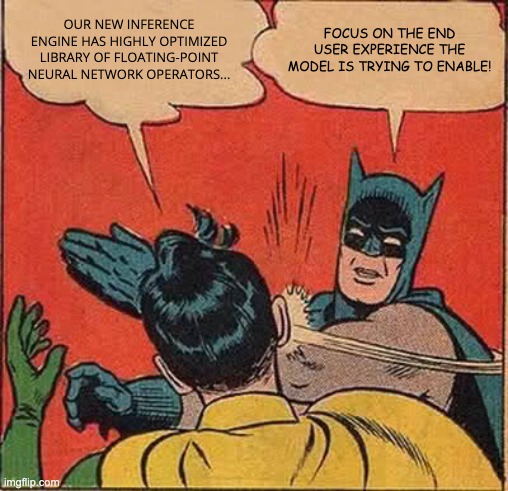
So what does it mean to apply user-centered design to ML development? To me, it means introducing structure to the model development workflow while abstracting away as much of the underlying engineering as possible. This allows creators to spend less time on developing the ML functionalities, and more time on creating machine intelligence into their applications to enhance the user experience. In Core ML’s presentation, the team listed some of Core ML’s core design principles:
- Simple: The tool should provide unified inference API and Xcode integration to enable a seamless end-to-end developer experience.
- Performant: The output inference engines should be fine tuned to have reduced artifact size, improved accuracy, and decrease prediction times.
- Compatible: The framework should support popular training libraries and public model formats.
On performance, the Core ML team further explained their approach to ensuring the model is performant by default:
- Strict user privacy: The model should run solely on the user’s device without needing network connection so that user data remains private.
- Always available: The model should live on the user’s device so that it’s always available as long as the device is operational.
- Reduced data cost: The model should leverage transfer learning with pre-trained neural networks to minimize the data needed to create new models.
The design principles certainly made sense, and the framework definitely helped streamline the developer experience. But as developer-friendly as Core ML is, it still involved a few lines of code.
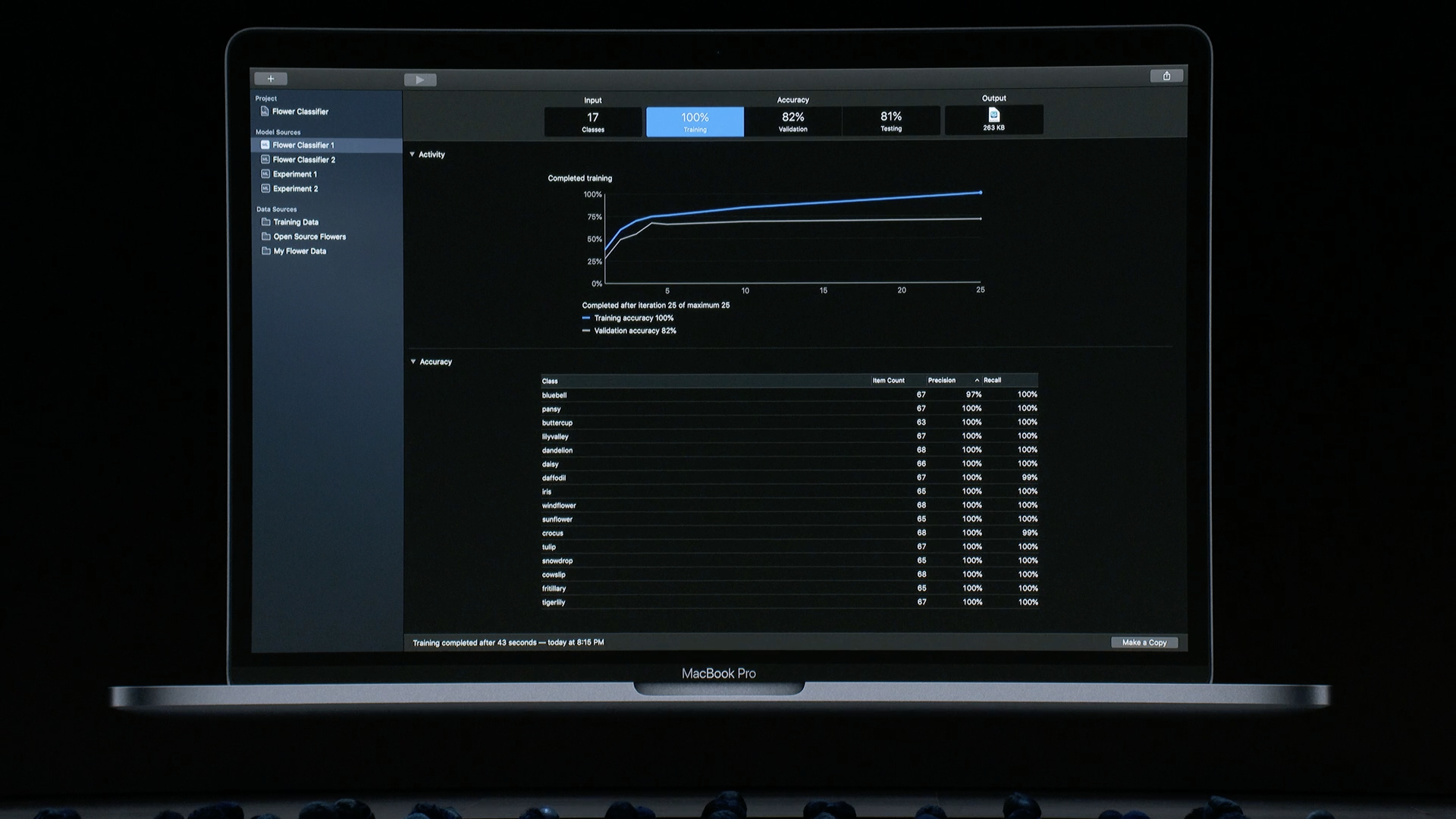
If you think about it, many parts of the development workflow can actually do away with code altogether. That process could evolve to become more like an interactive experimentation akin to “playing” with data and models rather than “coding” them. Apple understood this idea, so at WWDC19 they introduced Create ML, a desktop app built on top of Core ML that provided an intuitive and interactive workflow for creating deep learning models via an easy-to-use UI. By using Create ML, the developer simply defines the model inputs and outputs, and the app takes care of training, evaluating, and testing. The structured development workflow provided by Core ML, combined with Create ML’s intuitive UI, greatly simplifies the ML development lifecycle and enables continuous model improvement and experimentation.
COMPETITORS
Of course, Apple is not the only tech company working to streamline engineering of deep learning applications for app developers and everyday creators.
In late 2016, Facebook announced Caffe2Go, a lightweight framework for doing real time style-transfer that adds art-like filters to mobile phones. However, that project seems to be inactive now, as a Google search of the name links to a Dutch portable coffee maker (!?). Then in 2017, Google announced Tensorflow Lite, a neural network library for mobile phones. It provides a similar framework as Core ML, but instead focused on the Tensorflow ecosystem. While TFLite is compatible with iOS, Android, web, microcontrollers, Raspberry Pi, Linux, Windows, and Mac for multi-platform deployment, the developer experience isn’t as smooth as what Create ML offers.
WHAT I LIKE
Apple’s softwares, like its hardwares, is always made with heavy emphasis on design and user experience. The user interface of all of its softwares is so intuitive that anyone can use it to perform sophisticated tasks like making movies (iMovies) and recording music (GarageBand) with relative ease. And Core ML and Create ML are no exceptions. I especially like some of the AI design patterns that are used to enhance the overall developer experience:
- Explain the benefit, not the technology. Rather than focusing on the technical details of the deep learning models and MLOps workflows, Create ML emphasizes how its pre-built learning algorithms can perform transfer learning (list of available pre-trained models) to enable complex computer vision and natural language tasks.
- Set the right expectations. Create ML sets clear rules and visual boundaries within the development environment to define 3 phases of the model creation process: input, training, and output. With a clear structure, users are better guided in their ML journey and are less likely to get lost along the way. This is a non-trivial design achievement as ML development steps can oftentimes be complex.
- Anchor on familiarity. The UI is fully WYSIWYG, and the interactive visual elements in the interface are full of affordances that invite users to interact with them. Actions like drag and drop of new data for training, or interactively filtering tables to slice the metrics and better understand the model’s performance. This familiarity in interface reduces friction when setting up experiments, visualizing model performance, and saving and sharing models.
OPEN QUESTIONS
Here are some of the questions I have as I learned about Core ML and Create ML.
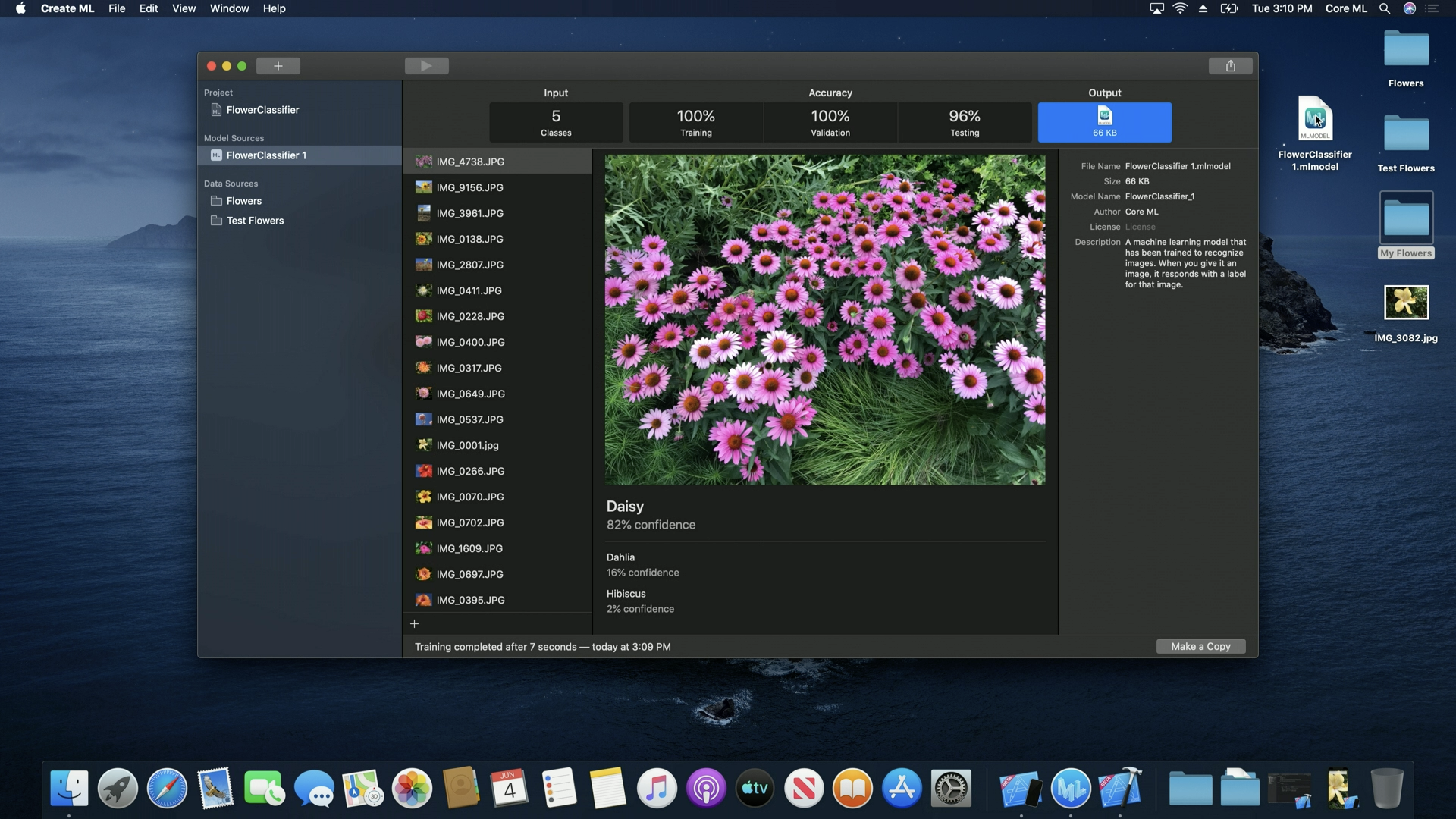
- How well do the models really perform? The live demos shown in the talk suggested that only a few tens of images and a few minutes of training are needed to create models that can perform non-trivial tasks like classify flower types, but can the models perform well out in the wild? The demo gave off a “too good to be true” vibe, so I’m a bit skeptical about that.
- Can Create ML be the gateway to widespread use of state-of-art AI? We keep hearing about the emergence of new deep neural networks, such as DALL-E-2 or GPT-3, that can perform wildly creative tasks like art generation (e.g. Leonardo entering the metaverse) but are huge models trained with billions of parameters. Is it possible that those fancy models can eventually be packaged as a pre-trained Create ML model that can be easily used by developers? A BERT model is already available in the Core ML model library, so I can foresee those very large models eventually making their way to Core ML for mass consumption. If so, Core ML and Create ML can become a gateway for the masses to adopt state-of-art AI.
- Where does Core/Create ML fit in the overall MLOps landscape? This study of Create ML raises an interesting potential implication about the future of MLOps: Will low- to no-code enterprise ML platforms like Databricks, H2O.ai, Alteryx, Abacus.ai, and Dataiku eventually abstract away MLOps to a point that ML engineering becomes fully automated and “commoditized”? In other words, can good design and well-orchestrated framework make ML engineering (e.g. feature store, model training, evaluation, deployment, monitoring) a turnkey solution that even non-technical users can apply with ease?
CONCLUSION
MLOps is a hot topic nowadays as companies begin to understand that solid ML operation is the key to maximizing ROI, and many enterprise low-code and no-code ML platforms have emerged to capitalize on this opportunity. While Create ML (and Core ML) is not considered an enterprise ML platform as it targets very different end users and serves smaller use cases, both classes of tools are trying to achieve essentially the same thing, and that is to offer an intuitive approach to create and use ML models.
I think Core ML and Create ML introduce an interesting new paradigm for ML engineering, and Apple executed it well by drastically simplifying the cumbersome work of model lifecycle management. I really like Core ML and Create ML’s user-centered approach to creating a ML platform for enabling continuous model experimentation, and I’m excited to see how they continue to evolve.